A low pass gate for Ableton Live. It stays shut until a MIDI note strikes it, then falls back on its own: the volume and the brightness of the sound go down together, the way a struck drum or string dies away.Ableton Live のためのローパスゲート。MIDI ノートに叩かれるまで閉じていて、ノートが来るたびに開き、あとはひとりでに閉じていきます。音量と明るさが一緒に下がるので、太鼓や弦を叩いたあとのような減衰になります。
12.2 or later Suite, or Standard with Max for Live12.2 以降 Suite、または Standard + Max for Live
Typeタイプ
Audio effect with its own MIDI inputMIDI 入力を持つオーディオエフェクト
What It Is概要
Hibiki (M4L version) is a free Max for Live audio effect by Kansu Audio, a software interpretation of the low pass gate (LPG): a volume control and a low pass filter moved by one signal, so the sound gets quieter and darker together. The LPG comes from Don Buchla's west coast modular synths. Inside the hardware sits a vactrol, a small light facing a light-sensitive resistor: it opens fast and closes slowly on a soft curve, and that curve is what makes a hit sound struck rather than switched off. Hibiki models that response in software.Hibiki (M4L version) は、Kansu Audio が無料で配布している Max for Live のオーディオエフェクトで、ローパスゲート(LPG)をソフトウェアで解釈したものです。LPG は音量とローパスフィルターをひとつの信号で同時に動かす回路で、音は小さくなると同時に暗くなっていきます。Don Buchla のウエストコースト系モジュラーシンセから生まれました。ハードウェアの中にはバクトロール(小さな光源と、光に反応する抵抗の組み合わせ)があり、すばやく開いて、柔らかいカーブでゆっくり閉じます。このカーブのおかげで、音はスイッチで切ったようにではなく、叩いたように鳴ります。Hibiki はこの反応をソフトウェアでモデル化しています。
A note-on strikes the gate. Velocity sets how hard, on a curve that makes soft notes clearly softer than loud ones. Pitch, channel and note length make no difference, and note-offs are ignored: once struck, the gate falls back over the DECAY time. A note that lands while the gate is still open first pulls it down by about a third, then opens it again, so fast repeats stay separate. The fall of each hit varies at random by up to 8 %, so a run of identical notes does not sound copied.ノートオンがゲートを叩きます。叩く強さはベロシティで決まり、カーブがかかっているので弱いノートははっきり弱く鳴ります。音程、チャンネル、ノートの長さは関係なく、ノートオフは無視されます。一度叩かれたゲートは、DECAY の時間で閉じていきます。ゲートが開いているうちに次のノートが来ると、いったん 3 分の 1 ほど沈んでから開き直すので、速い連打でも一打ずつ分かれて聞こえます。減衰の長さは一打ごとに最大 8 % ランダムに揺れるので、同じノートを並べてもコピーしたような音になりません。
Demosデモ
Controlsコントロール
Controlsコントロール
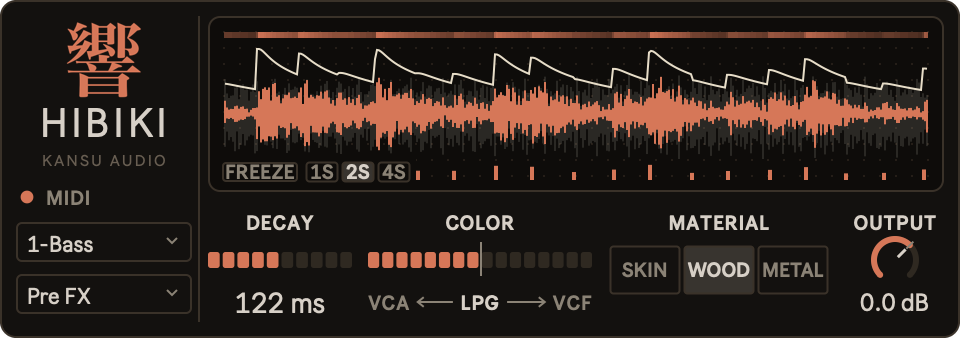
DECAY
how long the gate takes to fall back after a hit, 5 ms to 3 s打撃のあとゲートが閉じていく時間、5 ms〜3 秒
COLOR
what the gate closes: the volume (VCA), both (LPG) or the brightness (VCF)ゲートが何を閉じるか。音量 (VCA)、両方 (LPG)、明るさ (VCF)
MATERIAL
how the gate opens and falls: SKIN, WOOD or METALゲートの開き方と閉じ方。SKIN、WOOD、METAL
OUTPUT
level after the gate, -24 to +12 dBゲート後のレベル、-24〜+12 dB
Double-clickダブルクリック
returns DECAY to 122 ms, COLOR to 50 % and OUTPUT to 0.0 dBDECAY は 122 ms、COLOR は 50 %、OUTPUT は 0.0 dB に戻る
Materialsマテリアル
SKIN
damped: slowest to open, quickest to close, the brightness drops well before the volume. Attack 3 ms, fall 0.7 x DECAYミュート。開くのが最も遅く、閉じるのが最も速い。明るさが音量よりかなり先に落ちる。アタック 3 ms、減衰 DECAY × 0.7
WOOD
neutral, the default: a clear attack and a tail that stays out of the way. Attack 0.5 ms, fall as setニュートラル、初期値。輪郭のはっきりしたアタックと、邪魔にならない余韻。アタック 0.5 ms、減衰は設定どおり
METAL
ringing: fastest to open, slowest to close, the tail keeps its top end. Attack 0.3 ms, fall 1.4 x DECAY余韻。開くのが最も速く、閉じるのが最も遅い。余韻に高域が残る。アタック 0.3 ms、減衰 DECAY × 1.4
COLOR
VCA ← LPG → VCF
The scale under the bar reads VCA <- LPG -> VCF. At 0 % the gate closes only the volume. At the centre mark, 50 % and the default, it closes both: volume and brightness follow every hit together, the full low pass gate. At 100 % it closes only the brightness: the volume stays up and only the filter falls. COLOR and OUTPUT glide over 20 ms, so turning or automating them does not click.バーの下には VCA <- LPG -> VCF と表示されます。0 % ではゲートは音量だけを閉じます。中央のマーク (50 %、初期値) では両方を閉じ、音量と明るさが打撃ごとに一緒に動くローパスゲートそのものになります。100 % では明るさだけを閉じ、音量は下がらずにフィルターだけが閉じます。COLOR と OUTPUT は 20 ms かけてなめらかに変化するので、回してもオートメーションで動かしてもクリックノイズは出ません。
MIDI
On a modular system an LPG is struck by a trigger: a short pulse into its STRIKE input flashes the light inside the vactrol, and the vactrol falls back on its own. Inside Live there are no trigger cables between devices, so HIBIKI takes MIDI notes instead. Each note-on is one strike, and its velocity sets how hard the strike is. Pitch and note length play no part.モジュラーシステムでは、LPG はトリガーで叩かれます。STRIKE 入力に短いパルスが入るとバクトロールの中の光が一瞬点き、あとはバクトロールがひとりでに閉じていきます。Live の中にはデバイス同士をつなぐトリガーケーブルがないので、HIBIKI は代わりに MIDI ノートを使います。ノートオン 1 つが 1 回の打撃で、ベロシティがその強さを決めます。音程やノートの長さは関係ありません。
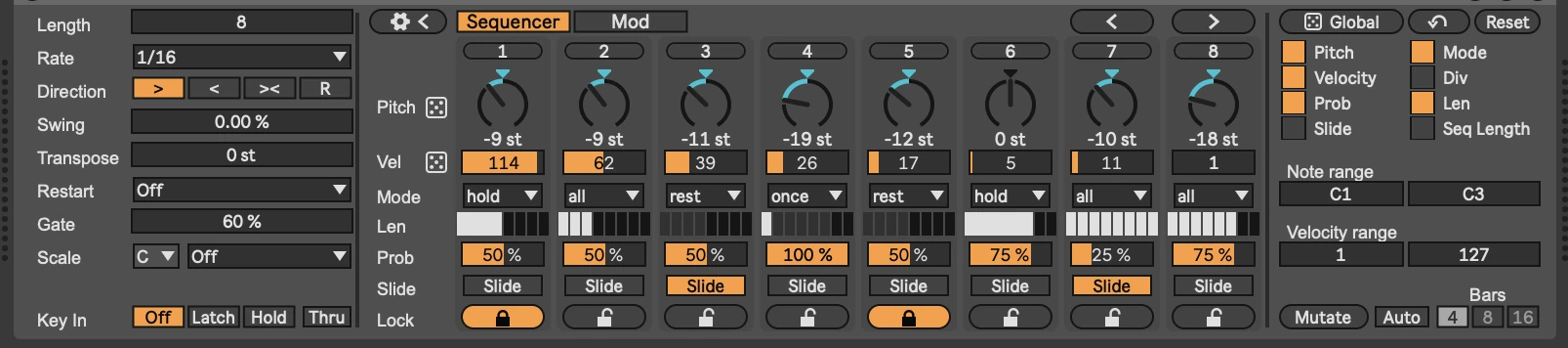
HIBIKI is an audio effect with its own MIDI input. The top menu picks any MIDI track in the set, including the one HIBIKI sits on. The lower menu picks where on that track the notes are taken: Pre FX for the notes as the clips play them, Post FX for the notes after the track's MIDI effects, such as an Arpeggiator or a sequencer device. The MIDI light flashes on every note that arrives.HIBIKI は自分の MIDI 入力を持つオーディオエフェクトです。上のメニューでは、HIBIKI を挿したトラック自身を含め、セット内のどの MIDI トラックでも選べます。下のメニューでは、そのトラックのどこからノートを取るかを選びます。クリップが再生したままのノートなら Pre FX、Arpeggiator やシーケンサーデバイスなど、トラックの MIDI エフェクトを通った後のノートなら Post FX です。ノートが届くたびに MIDI ランプが点灯します。
On one track, put HIBIKI after the instrument and pick the same track: the instrument plays the notes and HIBIKI gates its sound. On two tracks, put HIBIKI on an audio track with a loop, a pad or a recording, and write the rhythm into a clip on a MIDI track that needs no instrument. HIBIKI plays no pitches and sends no MIDI on.1 トラックで使うときは、MIDI トラックの音源の後ろに HIBIKI を挿し、このトラック自身を選びます。音源がノートを鳴らし、HIBIKI がその音にゲートをかけます。2 トラックで使うときは、ループ、パッド、録音した素材などのオーディオトラックに HIBIKI を挿し、MIDI トラックのクリップにリズムを書きます。この MIDI トラックに音源は要りません。HIBIKI は音程を鳴らさず、MIDI を先へ送ることもありません。
Free無料
One .amxd file. Drag it onto a track, and save it in your User Library to find it in Live's browser later. Needs Ableton Live 12.2 or later: Suite, or Standard with Max for Live..amxd ファイル 1 つ。トラックにドラッグするだけです。あとで Live のブラウザから呼び出すには、User Library に保存してください。Ableton Live 12.2 以降の Suite、または Max for Live を入れた Standard が必要です。